Most web designers don't have a pipeline. They have a hope.
They hope clients call. They hope referrals materialize. They hope their last project leads to another. When that fails—which it does, eventually—they scramble. They post on Facebook. They ask their network. They drop their rates.
This is what a non-system looks like.
A real pipeline is different. It's repeatable. It works whether you're busy or quiet. It generates clients on demand because it's built on a process, not luck.
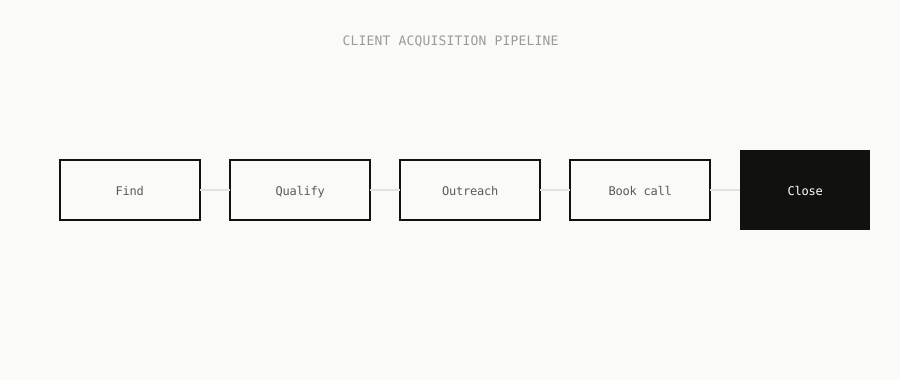
This is the complete framework we'd use to build that pipeline—from identifying which businesses are actually buyable prospects to closing them into a contract.
Part 1: Identifying Prospects Worth Pursuing
Not every business that needs a website redesign is a good client for you.
Some are dead ends. Some have no budget. Some are tire kickers who'll waste 20 hours of your time and then hire their nephew.
You need to identify businesses that meet three criteria:
1. They Have A Problem You Can Solve (Website Quality Signal)
Look for these specific indicators:
- Website hasn't been updated in 3+ years (outdated design patterns, old testimonials with 2020 dates)
- No mobile optimization (site breaks on phone)
- No booking/appointment system despite being a service business
- Thin or missing contact information
- No clear call-to-action above the fold
- Slow loading times (legitimate performance issue)
- No SSL certificate (shows negligence)
- Broken links or missing pages
These aren't subjective "the design looks bad" assessments. These are concrete signals that the website is actively costing them business.
Why this matters: A dental practice with an outdated website is losing patients. A plumbing company without a booking system is losing calls. An accountant with poor mobile experience is losing prospects. These businesses feel the pain. They're closer to buying.
2. They Have Revenue To Invest In Solutions
A business needs to be generating enough revenue to justify a website investment. A one-person freelancer with £15k annual revenue isn't your client. A dental practice billing £500k annually is.
How do you estimate revenue?
- Google their Google Business profile (review volume, years in business)
- Check their physical location (commercial vs. residential tells you scale)
- Count their team (more staff = more revenue)
- Look at their service offering (£50 haircuts vs. £500 haircuts)
- Research their industry (what's typical revenue for that service type in your region)
You're not going for precision. You're eliminating the bottom 30% who can't afford you anyway.
3. They're Actually Making Business Decisions
A business run by someone who cares about results is different from a business run by someone who's just going through the motions.
Quick signals:
- Do they have active social media (engagement, regular posts)?
- Are they investing in other marketing (ads, Google Business optimization)?
- Do they have good online reviews (shows they care about reputation)?
- Is their physical location well-maintained (signals overall quality)?
If they're actively investing in their business in other areas, they'll invest in a website.
If their Google Business hasn't been touched in 2 years, their social media is dead, and their Google reviews are from 2019—they're not a buyer. Move on.
Part 2: Finding These Prospects At Scale
Now you know who you're looking for. How do you find them?
Manual research is death. If you're spending 2 hours finding 5 prospects, you're not building a pipeline. You're running a hamster wheel.
Database approach:
- Use tools like Termly, Apollo.io, or Hunter.io to pull lists of businesses in your target industry/location
- Filter by size (employee count, revenue estimates)
- Add them to a spreadsheet
Utexlab approach: If you're building a real pipeline, you need automation. Utexlab is designed for exactly this—automatically finding prospects matching your criteria, scoring them by pain level (website quality), and preparing them for outreach.
Instead of manually researching 5 businesses, you can set up searches for:
- "Dental practices in London with outdated websites"
- "Plumbing companies in Manchester without booking systems"
- "Accountants in Birmingham with poor mobile experience"
Utexlab finds these automatically, scores the pain level, and prepares them for the next step.
Realistic volume: A solid search in your local market should surface 50-150 qualified prospects per week, depending on your niche and location. That's your pipeline fuel.
Part 3: Qualifying Before You Reach Out
This is where most designers fail.
They find 100 prospects and email all 100 with the same generic message. They get 2-3 replies and think that's normal.
Better approach: Qualify before outreach.
Before you send a single email, you should know:
- What specific problem their website has
- Why that problem matters to their business
- What the conversation should be about (not "we build websites," but "your site isn't capturing calls")
Qualification checklist:
- Website pain: What's broken? (No mobile, no booking, outdated design, slow)
- Business type: Is this a business that needs new clients? (Yes = most service businesses. No = utility companies, government offices)
- Decision maker: Who decides? (Owner? Manager? You need to reach the right person)
- Likely budget: Based on business size and industry, can they afford £3k-10k?
- Urgency: Do they have seasonal pain points? (Dental: January. Fitness: January. Accounting: April)
This should take 5-10 minutes per prospect. If you can't answer these questions, skip them.
Why qualification matters: When you reach out with a specific insight ("Your site isn't loading on mobile, which is why prospects are bouncing"), you sound like someone who did research, not a mass emailer.
Part 4: The Personalized Outreach Message
Generic cold email has a 0.5-2% reply rate.
Personalized cold email, done right, gets 4-8% reply rates.
The difference isn't effort. It's specificity.
Generic: "Hi [Name], I help businesses build better websites. We've worked with 50+ companies in your industry. Would you be open to a chat?"
Personalized: "Hi [Name], I noticed your site doesn't load properly on mobile—most prospects are browsing on their phones, so that's probably costing you calls. I've helped [similar business type] redesign for mobile conversion. Worth a quick chat?"
The formula:
- Observation: Something specific about their business/website
- Why it matters: The business impact
- Social proof: Similar business you've helped
- Clear ask: Calendar link to book a call
Length: 2-3 sentences. That's it.
Subject line: Should reference something about their business, not a generic "Quick question?"
Timing: Send between 9-11am or 6-8pm. Avoid 3-5pm (too busy).
Follow-up sequence:
- Initial email
- +5 days: Follow-up with different angle or new info
- +7 days: Final follow-up
- Then stop. Move on.
Utexlab's role here: If you're doing this manually with 100 prospects, you'll spend 10 hours writing custom emails. Utexlab generates these automatically—analyzing each prospect's website, identifying the specific pain point, and writing a personalized email. The tone is natural, the personalization is genuine, and it lands in their inbox at optimal times.
Part 5: Detecting Replies & Moving Fast
Cold email campaigns die because of slow response.
Someone emails you on Tuesday. You don't check email until Thursday. By then, they've moved on or emailed someone else.
Speed matters.
Manual approach: Check your inbox 3x daily, move interested prospects to a spreadsheet, manually send a calendar link.
Automated approach: Use email parsing (IMAP monitoring) to detect replies in real-time, instantly send calendar link, get them booked before they lose interest.
What to look for in a reply:
- Positive signal: "Sounds interesting," "Tell me more," "When can we chat?"
- Neutral signal: "Interesting, but we're not looking right now" (not a yes, but not a no)
- Negative signal: "Not interested," "We're happy with our current site," "Too expensive"
Only the positive signals get a calendar link.
Neutral signals? You can follow up in 3 months. That prospect isn't dead, just not ready.
Utexlab's approach: Monitors your email in real-time. When someone replies, you get notified immediately. A calendar link is automatically sent. They can book a call in seconds. No back-and-forth scheduling.
This cuts your sales cycle from 5-7 days down to 24 hours.
Part 6: The Discovery Call Framework
Your call isn't a pitch. It's a diagnosis.
You're trying to understand:
- What's actually broken with their current site?
- How is it affecting their business (lost calls, lower conversions, poor mobile experience)?
- What's their actual timeline for fixing it?
- Who else needs to be involved in the decision?
Opening (first 2 minutes): "Thanks for hopping on. I know you're busy. This is just to see if a website redesign actually makes sense for you right now. Cool?"
They'll nod. You move to diagnosis.
Diagnosis (5-7 minutes):
Ask in this order:
- "Walk me through your current website situation. What's working and what's not?"
(Listen. Don't interrupt. They'll tell you their pain.)
- "How's that impacting your business? Are you losing leads? Conversions?"
(They quantify the problem. This becomes your pitch later.)
- "What's holding you back from fixing it?"
(Budget? Priority? Didn't know where to start? This is important.)
- "What would an ideal website do for your business?"
(They describe what success looks like.)
- "If we could solve [problem], what would that be worth to you?"
(They give you a range. Even if they're vague, you get a sense of value.)
Timeline (2-3 minutes):
"Are you thinking about this for the next month, quarter, or further out?"
This tells you if they're real or just exploring.
Next step (1 minute):
"Here's what I'm thinking. Let me mock up a quick design audit of your current site—specific things we'd change and why. Send that over in a few days. We can hop on a follow-up call and see if it makes sense to move forward. Sound good?"
This gives you 3-5 days to prepare a proposal without them feeling pressured.
Don't pitch on the discovery call. You're gathering information, building rapport, and qualifying.
Part 7: The Proposal & Qualification
Not every prospect becomes a client.
Some will say "This is great, but it's too expensive" or "We need to think about it" or "Let's revisit in 6 months."
These aren't sales failures. These are qualification successes. You found out they're not ready to buy right now. You can follow up later.
Your proposal should include:
- Specific findings: "Your site isn't mobile-optimized. 60% of people browse on phones. This is why you're losing leads."
- Recommended changes: 5-7 specific design/functionality improvements
- Expected impact: "This should increase form submissions by 30-50%"
- Timeline: How long will it take?
- Investment: Price (break down by phase if it's a bigger project)
Single-page proposal is better than 10-page proposal. They won't read 10 pages.
Pricing structure:
For web design, you have options:
- Fixed price (e.g., £5,000 for a redesign)
- Tiered pricing (e.g., £3k basic, £6k advanced, £10k premium)
- Hourly (not recommended for proposals—gives the client sticker shock)
Fixed pricing is cleaner. It shows confidence. It makes them feel in control (not nickel-and-dimed).
Follow-up on proposals:
Send the proposal. Wait 3 days. If you haven't heard back, send a gentle check-in:
"Hey [Name], just wanted to follow up on that proposal I sent. Do you have any questions about the approach or investment? Happy to clarify anything."
Wait another 3 days. If still no response, final check-in:
"No worries if the timing isn't right. I'll revisit in 3 months to see if things have shifted. Let me know if anything changes sooner."
Then you move on. Put them in a "revisit" folder.
Part 8: Closing The Deal
If they're ready, this is simple.
"Should we kick this off? I'll need [X files/access] from you to get started."
If they're hesitating, common objections are:
"It's too expensive." "What's your concern—the overall investment or the timeline to recoup it? Most of my clients see ROI within 2-3 months because the site drives more leads."
"We need to think about it." "That's fair. Is there anything unclear about the approach or timeline that I can clarify? Or is it more about priorities shifting?"
"Can you do a smaller version for less?" "I'd rather do one thing well than water it down. But I can break this into phases—redesign now, add features later. That spreads the cost. Would that work better?"
"We want to get another quote." "That makes sense. Just so you know what to compare—we're including [X, Y, Z]. Other designers might not include all that. Ask them specifically about those when you get their quote."
None of these are rejection letters. They're qualification steps.
If they're still hesitating after these, they're not ready. You're wasting time trying to convince them.
Move on to the next prospect.
Part 9: Systemizing This Pipeline
This is where most designers fail. They close one deal and then stop prospecting. The pipeline goes empty.
Real pipeline is continuous.
Every single week:
- Find 30-50 new prospects
- Research 5-10 of them deeply
- Send outreach to those 5-10
- Monitor for replies
- Book discovery calls
- Send proposals
This becomes automatic. It's not "business development" anymore. It's a repeatable system.
Tracking your pipeline:
Use a simple spreadsheet or CRM:
| Name | Company | Status | Date Added | Website Pain | Discovery Call | Proposal Sent | Deal Won | |------|---------|--------|------------|--------------|---|---|---| | John | ABC Dental | Cold | Sept 1 | No mobile | Sept 10 | Sept 15 | Sept 25 | | Sarah | XYZ Plumbing | Cold | Sept 1 | No booking | - | - | - |
Track this weekly. You'll see patterns:
- How many prospects convert to discovery calls (should be 10-15%)
- How many discovery calls convert to proposals (should be 60%+)
- How many proposals convert to deals (should be 40-60%)
- Your average deal value
- Your average sales cycle
Optimization:
Once you have data, you optimize:
- If discovery-to-proposal conversion is low, your discovery questions are off
- If proposal-to-deal conversion is low, your pricing is too high or your proposal isn't compelling
- If cold-to-discovery is low, your outreach message needs work
You don't guess. You measure.
Part 10: Scaling This Pipeline
Single designer → busy but not growing.
When you want to scale, you need leverage.
Option 1: Hire a business development person Someone who handles prospecting, outreach, and discovery calls. You just do proposals and delivery.
Option 2: Automate the repetitive parts Use tools to handle finding prospects, sending personalized emails, detecting replies, and booking calls. You focus only on discovery calls, proposals, and closing.
Utexlab's role: It's the automation layer. It handles:
- Finding prospects matching your criteria (web design agencies, local service businesses, etc.)
- Analyzing their website for specific pain points
- Writing personalized outreach (the tone is natural, not robotic)
- Monitoring email replies in real-time
- Auto-booking calls when they reply
This cuts your pipeline operational overhead by 70%. You're not spending 15 hours a week on admin. You're spending 2-3 hours on high-value activities (calls, proposals, closing).
Summary: Your Complete Pipeline
Step 1 - Identify: Find businesses with website problems and budget to fix them Step 2 - Find: Use automation to surface 30-50 prospects weekly Step 3 - Qualify: Validate they're real buyers before outreach Step 4 - Reach out: Send personalized emails about specific problems Step 5 - Detect: Monitor replies and respond within hours Step 6 - Discover: Call to understand their problem and timeline Step 7 - Propose: Send specific, priced recommendations Step 8 - Close: Handle objections and finalize the deal Step 9 - Track: Monitor your pipeline metrics weekly Step 10 - Scale: Automate or hire once you've proven the model
This isn't complicated. But it's also not easy if you're doing it manually.
Most web designers can close 1-2 deals per month on referrals. With a real pipeline system, you can close 3-5 per month consistently. That's the difference between a £30k year and a £100k year.
The system does the work. You just execute it.
Next Steps
If you're building this from scratch:
- Pick your target market (local area + service industry)
- Spend a week manually qualifying 20-30 prospects
- Send 10 personalized cold emails
- See what reply rate you get
- Refine your message based on responses
- Once you have a repeatable process, add automation
If you want to skip the manual part and go straight to systemized prospecting, Utexlab handles the heavy lifting—finding prospects, analyzing their websites, writing personalized outreach, and booking calls automatically.
The pipeline still needs you for discovery calls, proposals, and closing. But the busywork is gone.
Either way: stop hoping clients call. Build the system that brings them to you.